


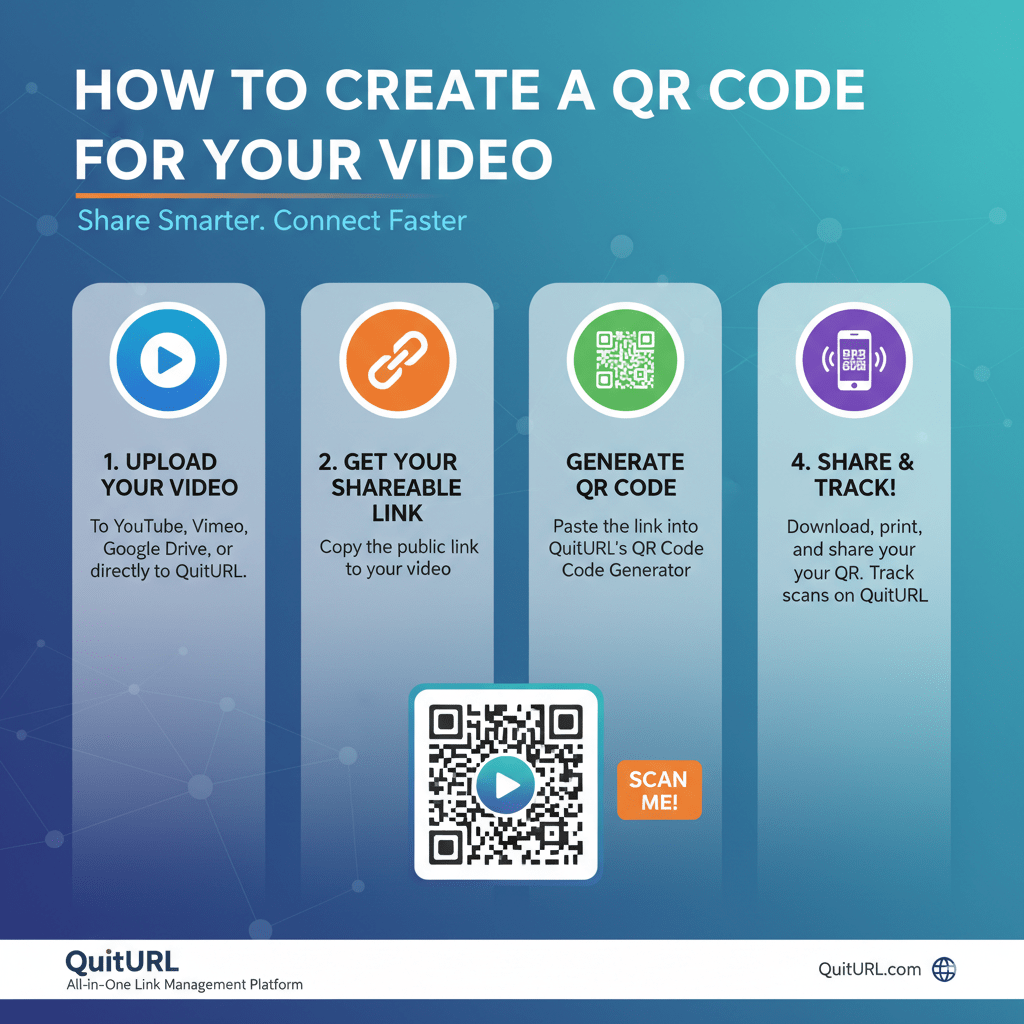
QR Codes have become a powerful tool for connecting audiences with digital content instantly. For videos, QR Codes provide an easy way for users to access content without typing long URLs, improving engagement and view rates. Whether you are a marketer, educator, or content creator, creating a QR Code for your video simplifies sharing and tracking performance. In this article, we’ll guide you through the process of creating QR Codes for videos, explore innovative use cases, and share tips for maximizing their impact with tools like QuitURL.
How to Create a QR Code for a Video
Creating a QR Code for a video is straightforward, but following best practices ensures it works effectively:
- Select Your Video Platform: Upload your video to a platform like YouTube, Vimeo, or a private hosting service. Ensure the link is shareable and accessible on mobile devices.
- Copy the Video URL: Copy the exact URL of your video. For private videos, make sure viewers have access or use a secure link.
- Use a QR Code Generator: Tools like QuitURL, Bitly, or other QR Code generators allow you to create a code by pasting the video link.
- Customize Your QR Code: Adjust colors, add a logo, or frame it with a call-to-action (CTA) like “Watch Video” to increase scanning.
- Test Your QR Code: Scan with different devices to ensure it works correctly and directs users to the intended video.
By following these steps, you can create a professional and scannable QR Code for any video.
How Enterprise Teams Can Use QR Codes for Video at Scale
Large teams and enterprises can leverage video QR Codes for streamlined communication and marketing:
- Training and Onboarding: Provide employees with quick access to training videos or policy updates through QR Codes on posters, handbooks, or internal portals.
- Marketing Campaigns: Embed QR Codes in print ads, packaging, or brochures to direct potential customers to promotional videos.
- Internal Communication: Use QR Codes for corporate announcements or product updates, ensuring employees can instantly access important videos.
- Customer Education: Enhance customer support by linking QR Codes to how-to videos, tutorials, or FAQs.
Enterprise teams benefit from scalability features such as bulk QR Code generation, analytics tracking, and dynamic updates to links—all available through tools like QuitURL.
Other Creative Ways to Use Video QR Codes in Your Strategy
Beyond basic sharing, video QR Codes can be used creatively to increase engagement:
- Event Promotion: Add QR Codes on flyers or event tickets linking to promotional or highlight videos.
- Product Packaging: Attach QR Codes to products that direct customers to tutorial or unboxing videos.
- Interactive Presentations: Include QR Codes in presentations to give audiences instant access to supporting video content.
- Social Media Integration: Share QR Codes in offline marketing materials to drive offline-to-online traffic.
By thinking creatively, video QR Codes can become a versatile tool in both marketing and operational strategies.
Best Practices to Follow to Create QR Codes for Videos
To maximize the effectiveness of your video QR Codes, follow these best practices:
- Optimize for Mobile: Most QR Code scans occur on mobile devices, so ensure your video platform is mobile-friendly.
- Include a Clear CTA: Encourage users to scan with text like “Scan to Watch” or “See How It Works.”
- Use High-Contrast Colors: Ensure the QR Code is easily scannable by maintaining good contrast between the code and background.
- Test Before Distribution: Test the QR Code on multiple devices and in different lighting conditions.
- Track Performance: Use dynamic QR Codes and analytics to monitor engagement, view rates, and user behavior.
These practices help create QR Codes that are functional, visually appealing, and effective in driving video engagement.
Get the Most Out of QR Codes for Your Video Strategy with QuitURL
QuitURL offers advanced features that make QR Codes for videos more powerful:
- Dynamic QR Codes: Update video links anytime without changing the printed code.
- Custom Branded Codes: Add logos, colors, and frames for consistent branding.
- Analytics Tracking: Measure scans, locations, devices, and engagement metrics.
- Bulk QR Code Generation: Create multiple QR Codes efficiently for enterprise campaigns.
- Landing Pages and Short Links: Direct users to a branded landing page with the video embedded for better user experience.
With QuitURL, businesses and creators can scale their QR Code strategy while maintaining high engagement and professional presentation.
FAQs
Q1: Can I create a QR Code for private videos?
Yes, you can create QR Codes for private videos as long as users have access through a shareable link or password-protected platform.
Q2: Will the QR Code still work if I change the video link?
If you use a dynamic QR Code, you can update the video URL without changing the printed code.
Q3: Are QR Codes effective for marketing videos?
Absolutely. QR Codes increase accessibility and can drive offline audiences to online video content effectively.
Q4: Can I track how many people scanned my QR Code?
Yes, using tools like QuitURL, you can track scans, locations, and device types to analyze engagement.
Conclusion
Creating a QR Code for your video is a simple yet powerful way to enhance sharing, engagement, and tracking. By considering the video platform, customizing QR Codes with branding, and following best practices, you can create scannable and attractive codes that users actually interact with. Enterprises and content creators can use tools like QuitURL to scale their video QR Code strategy, track analytics, and maintain professional branding. Whether for marketing campaigns, training, or customer engagement, video QR Codes bridge the gap between offline and online interactions, providing a seamless, accessible, and measurable experience.